
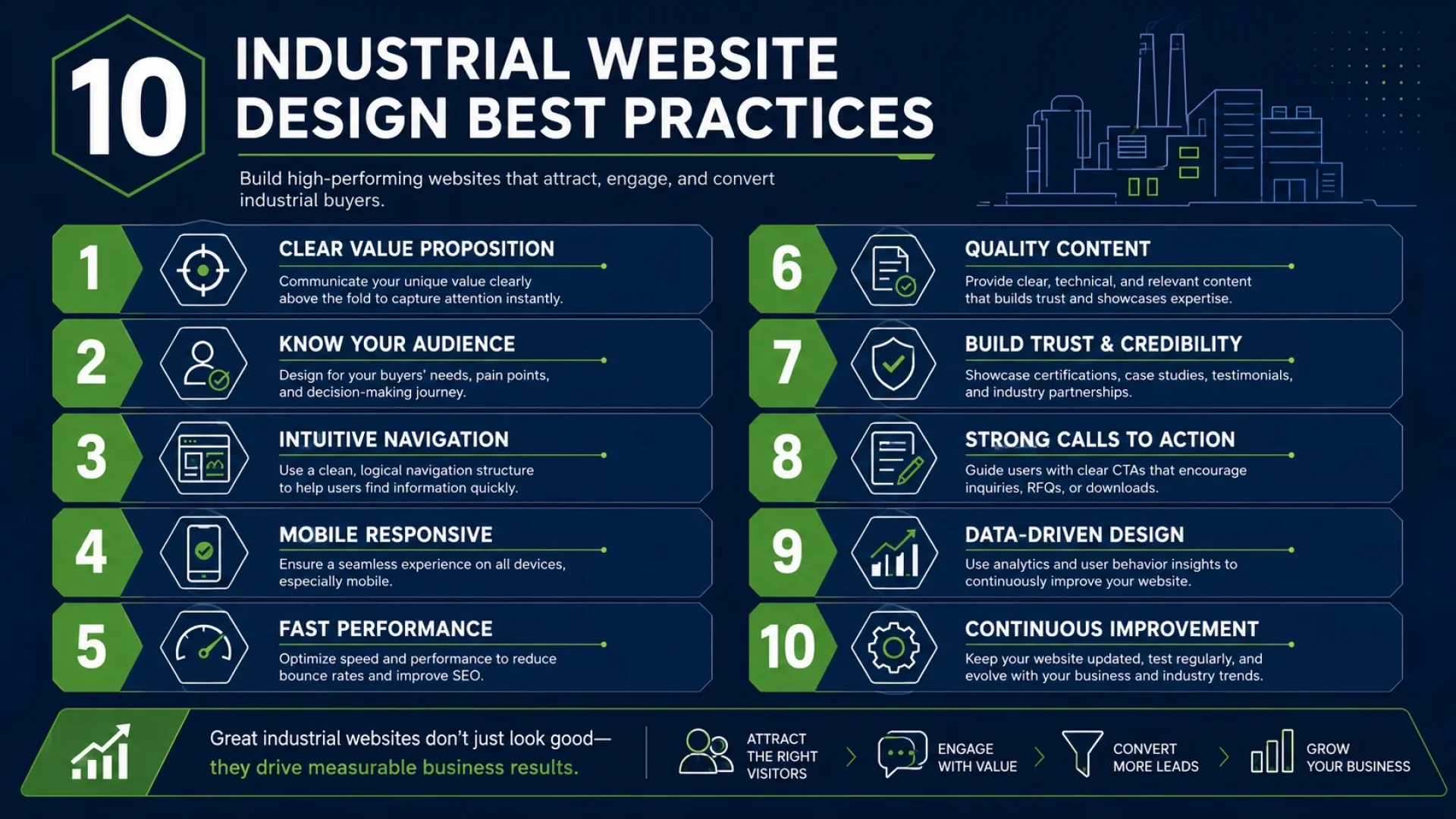
Your manufacturing website is not a brochure. It is your most active sales engineer — working 24 hours a day, evaluating buyers, presenting capabilities, and either capturing or losing qualified RFQ submissions while your sales team sleeps.
In 2026, B2B industrial buyers complete up to 80% of their supplier research online before making first contact with any vendor. They do not call. They do not email. They evaluate your website silently — and they decide within the first 60 to 90 seconds whether you are worth pursuing further.
If your industrial website was designed by a generalist agency using retail or SaaS templates, it is almost certainly failing that silent evaluation — every day, across dozens of potential clients you will never hear from.
This guide covers every industrial website design best practice that matters in 2026: the UX principles that procurement officers respond to, the technical foundations that make Google rank you, and the AEO-ready architecture that gets your business cited by Gemini and Perplexity when buyers ask AI engines to recommend suppliers.
These are not design opinions. They are engineering decisions with measurable revenue outcomes.
Best Practice 1: Design for the Procurement Officer, Not the General Visitor
The most common mistake in industrial web design is designing for a general audience. Manufacturing websites are not consumer products. They exist for one category of buyer: technically sophisticated professionals — engineers, procurement officers, plant managers — who are midway through a supplier evaluation when they land on your site.
These buyers are not browsing. They arrived with a specific question: ‘Can this company provide what I need, at the quality I require, within my timeline and budget?’
Your website’s job is to answer that question in under 90 seconds.
Map the Procurement Officer’s Decision Journey
Procurement officers typically follow a structured evaluation sequence. They look for:
- Machining or fabrication capability confirmation — does this supplier have the capability I need?
- Technical specification depth — what are the tolerances, materials, certifications, and order minimums?
- Evidence of relevant past work — case studies or project examples in my industry vertical.
- Quality credentials — ISO, AS9100, or sector-specific certifications.
- Contact accessibility — can I submit an RFQ directly, without having to navigate a maze?
Every page of your industrial website should be structured to satisfy this sequence, in this order. If your homepage forces a procurement officer to navigate three sub-menus before reaching your capabilities page, they have already left.
Information Hierarchy Is a Revenue Decision
In industrial web design, information hierarchy is not aesthetic — it is functional. The most critical technical data must be above the fold or within one click. Secondary supporting content sits below. Documentation and certifications are accessible, but do not crowd the primary evaluation path.
Pixerts uses a concept we call Information Density Calibration: every section of a page is scored for its relevance to the procurement officer’s primary question. Sections with low relevance are deprioritized. Sections with high relevance — capability ranges, tolerance specifications, certification badges — are elevated.
This is the approach we applied for clients like CHNZ Machine and Shandong Apex Precision Machinery, where procurement-focused page architecture directly correlated with increased RFQ volume post-launch.
Best Practice 2: Apply the 8px Grid System to Every Interface Decision
Consistency is not a design preference in industrial web design.
It is a trust signal. When a procurement officer evaluates three competing suppliers in a single afternoon, inconsistent spacing, misaligned elements, and visually disordered interfaces communicate one thing: lack of precision. That message is catastrophic for companies that sell precision as their core value proposition.
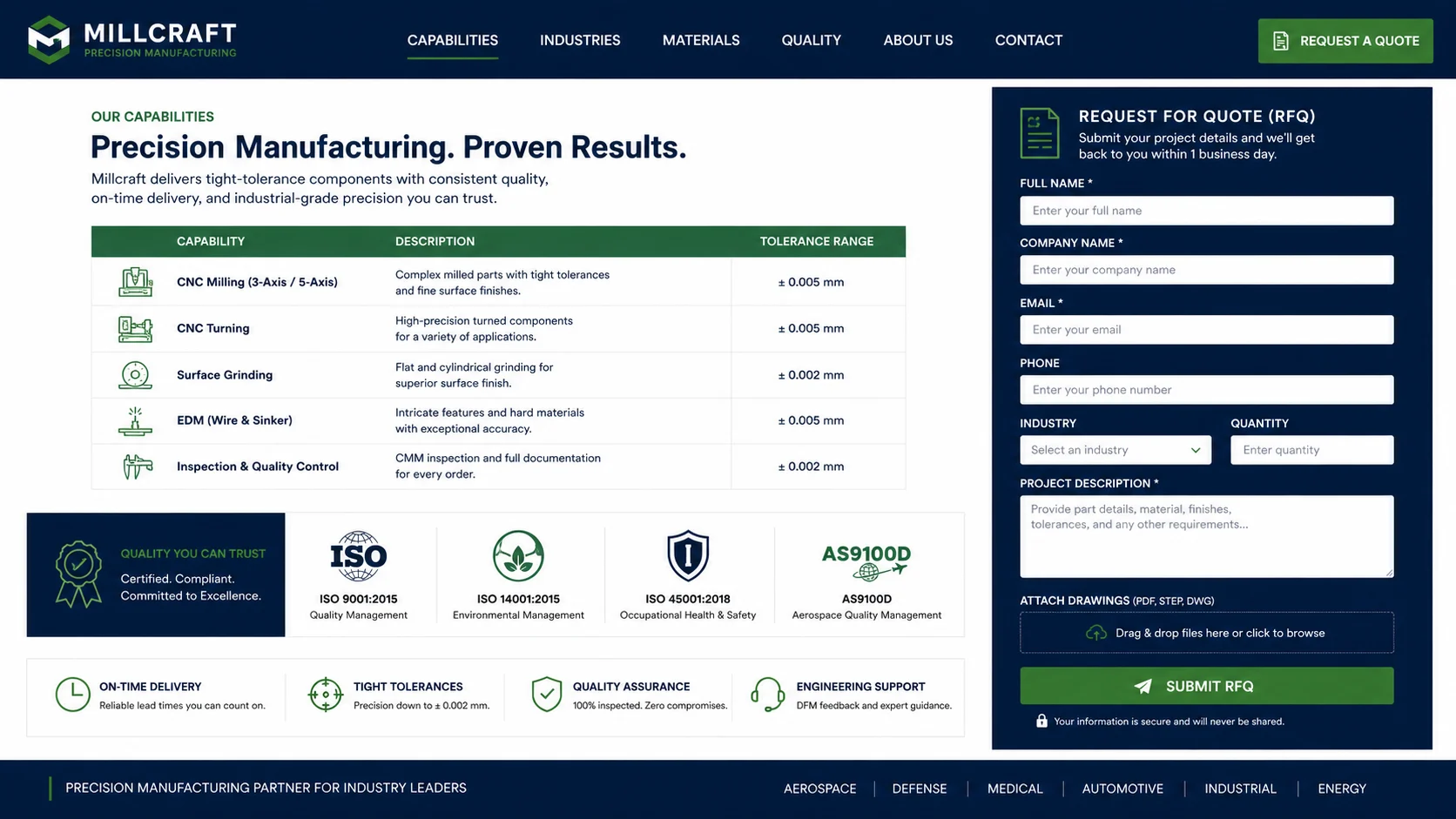
What the 8px Grid System Is
The 8px grid system is a math-based interface layout methodology in which all spacing, sizing, padding, and alignment decisions are based on multiples of 8 pixels: 8, 16, 24, 32, 40, 48, and so on.
Every element on the page — buttons, text blocks, image containers, table rows, form fields — is sized and positioned to fall on this grid. The result is a visually consistent, professionally precise interface that communicates the same meticulous attention to detail that your physical manufacturing processes embody.
| Grid Increment | Use Case for Industrial UX |
| 8px | Inner cell padding, icon sizing, minimum spacing between inline elements |
| 16px | Paragraph-to-heading gap, form field height, small component separation |
| 24px | Section sub-item spacing, card internal padding, list item gap |
| 32px | Card-to-card gap, section internal spacing, button height |
| 48px | Section-to-section spacing, column gap, hero sub-element spacing |
| 64px+ | Major section breaks, hero vertical padding, page-level separations |
Why It Matters for B2B Manufacturing Buyers
Industrial buyers — particularly engineers — have professional aesthetic intuitions calibrated around precision. An interface built on a consistent mathematical grid feels immediately correct to someone whose working life is governed by tolerances, measurements, and repeatable accuracy. An inconsistent interface feels wrong at a subconscious level — and that feeling erodes trust in your capabilities before your first word of copy has been read.
At Pixerts, the 8px grid is the foundation of every industrial UI kit we build. It is applied before design begins — not after — which is why our designs require fewer revision cycles and produce more consistent results across different device sizes.
Best Practice 3: Engineer Your RFQ Funnel with Zero Friction Points
The entire purpose of an industrial website is to produce a qualified RFQ submission. Every design decision should either support or accelerate that outcome. Decisions that create friction — extra navigation steps, confusing form fields, hard-to-find contact paths — cost you real revenue.
Identify and Remove Every Abandonment Trigger
Friction points in the industrial RFQ funnel are predictable. The most common are:
- Hidden capabilities: Technical specifications are buried under three levels of navigation rather than appearing directly on the main capabilities page.
- No CAD file upload: Requiring buyers to describe their part in a text field instead of uploading a DXF or STEP file.
- Excessive form fields: Asking for information the buyer cannot provide at the inquiry stage (e.g., exact quantity) before trust is established.
- Missing trust signals: No certifications, no client logos, no case studies near the RFQ form.
- Slow load time: Forms that take more than 2 seconds to become interactive lose a measurable proportion of mobile users.
Industry Benchmark: B2B industrial websites with technical friction lose 40–70% of qualified visitors before reaching the RFQ form. Removing the top 3 friction points — hidden specifications, complex forms, and missing certifications — consistently produces the largest single increase in RFQ conversion rate.
The Anatomy of a High-Converting Industrial RFQ Form
An optimized industrial RFQ form has the following characteristics:
- Minimum required fields at inquiry stage: company name, contact details, a brief description of the requirement, and an optional CAD file upload.
- Optional fields clearly labeled as optional — quantity, timeline, and budget are useful but should never gate submission.
- Immediate auto-response confirmation with a clear next step (e.g., ‘We will review your RFQ and respond within 1 business day’).
- Placed on every relevant page — capabilities, industry, and service pages — not just the contact page. Mobile-optimized with large touch targets and auto-complete enabled for business email fields.
Best Practice 4: Build for Core Web Vitals from Day One
Google’s Core Web Vitals are not a developer-only concern.
They are a revenue concern. Industrial websites that fail Core Web Vitals benchmarks rank lower in organic search and convert fewer buyers — because a slow, unstable page causes precisely the kind of first-impression failure that sends procurement officers to the next supplier on the list.
The Three Core Web Vitals That Matter Most for Industrial Sites
| Metric | Target & What It Means for Industrial UX |
| Largest Contentful Paint (LCP) | Under 2.5 seconds. This is when your most important visible content — usually the hero section with your value proposition and primary CTA — has fully rendered. Industrial buyers on mobile data connections in factory environments will abandon before this if it takes longer. |
| Cumulative Layout Shift (CLS) | Below 0.1. This measures visual instability — elements jumping around as the page loads. For industrial websites displaying specification tables, CLS above the threshold destroys the trust signal of a precision-focused brand. |
| Interaction to Next Paint (INP) | Under 200ms. This measures responsiveness — how quickly the page reacts when a buyer clicks your RFQ button or opens your specifications. A sluggish response is the digital equivalent of a slow handshake. |
How Pixerts Achieves Core Web Vitals Compliance on Industrial Sites
Every Pixerts WordPress build is configured from the ground up for Core Web Vitals performance. This includes server-side rendering of above-the-fold content, explicit image dimensions to eliminate layout shift, lazy loading below the fold, CDN delivery, and optimized cache configurations. We do not use heavy page builder plugins that inject 200 KB of unused JavaScript.
We do not use full-page animation libraries that defer First Contentful Paint. Performance is an architectural decision — not a post-launch fix.
Best Practice 5: Structure Every Page for AEO — Answer Engine Optimization
In 2026, a growing proportion of industrial procurement research begins with an AI query. A procurement officer may ask Perplexity: ‘Which CNC machining companies in Germany offer 5-axis capability under ISO 9001?’ Or an engineer might ask Gemini: ‘What are the best websites for plastic injection molding RFQ submission?’
The answer to that question will be drawn from websites that have structured their content for AI answer-engine citations. If your industrial website lacks this architecture, you are invisible in this channel — and the channel is growing.
What AEO-Ready Industrial Web Design Looks Like
AEO-ready industrial web design has four technical components:
- FAQ sections on every page: written in natural question-and-answer format, covering the specific queries your buyers use when researching suppliers.
- FAQPage JSON-LD schema: structured data that formally marks up your Q&A content for AI engines to parse and cite.
- Answer-first content structure: the direct answer to the page’s primary question appears in the first 100 words — AI engines extract this for featured snippets and AI overview citations.
- Semantic keyword architecture: the page’s focus keyword, secondary keywords, and LSI terms are distributed at the densities required for topical authority signals.
AEO Principle: The content that AI answer engines cite is content that directly answers a specific question with a concise, structured response — without requiring the engine to ‘interpret’ a long-form sales narrative. Every FAQ section and every section introduction on an industrial website should be written as if it is answering the question an AI engine is being asked.
Schema Markup: The Language AI Engines Read
JSON-LD schema markup is the technical layer that communicates your website’s content structure to both Google and AI answer engines. An industrial website without schema markup is speaking to search algorithms in an ambiguous dialect. An industrial website with a comprehensive schema is communicating in a structured, machine-readable specification.
At minimum, an industrial website needs Organization schema, Service schema for each capability page, FAQPage schema on every page with Q&A content, and BreadcrumbList schema for navigation hierarchy. Pixerts builds this into every site as a default — not as an upgrade.
Best Practice 6: Build Technical Specification Pages That Win Supplier Evaluations
Industrial buyers need technical data. Not marketing language. Not brand stories. Technical data, organized clearly, verifiable on the page.
Every manufacturing website needs at least one dedicated technical specifications page for each product category or process capability. This page is what procurement officers bookmark, share with colleagues, and return to before sending an RFQ.
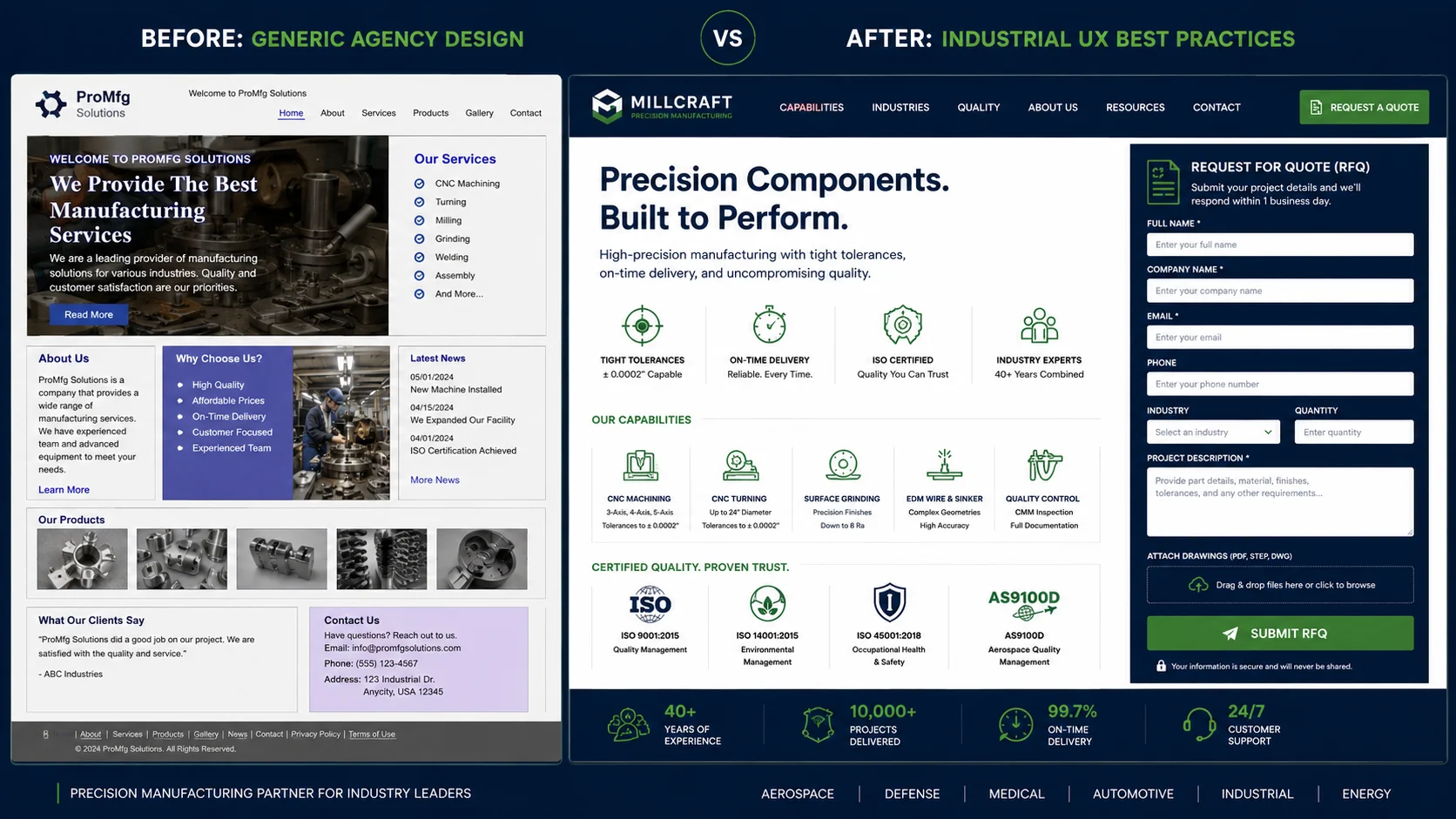
What a Technical Specification Page Must Include
- Process capability summary: machining type, axis count, process description, materials range.
- Specification ranges: tolerances, surface finishes, minimum and maximum part sizes, and weight limits.
- Quality certifications: ISO number, certificate number, issuing body, expiry date — displayed prominently.
- Equipment list (where appropriate): machine models, vintage, and current operating capacity. Capability statement: a concise, factual paragraph written for an engineer, not a marketer.
- Related case studies: 2–3 internal links to projects in the relevant sector or process. Inline RFQ CTA: a form or button directly on the specifications page — never requiring a separate navigation step.
These pages should be the most SEO-dense pages on your industrial website. They should rank for capability-specific search terms (‘5-axis CNC machining tolerance range’, ‘GMP-compliant filling machine specifications’) — the long-tail, transactional queries that indicate a buyer is in the final evaluation stage.
Best Practice 7: Mobile Performance Is Not Optional for Industrial Sites
Industrial buyers are not always at desks. Procurement officers review suppliers on mobile during factory walks. Engineers evaluate specifications on tablets between line checks. Plant managers compare vendors on their phones during transit.
A manufacturing website that performs poorly on mobile is not ‘less than optimal’. It is functionally useless for a significant portion of your audience.
Industrial Mobile UX Requirements in 2026
- Touch targets: all interactive elements (CTAs, form fields, navigation items), minimum 44x44px — never smaller.
- Font size: body text minimum 16px on mobile — smaller text is unreadable in factory lighting conditions.
- Table responsiveness: technical specification tables must reformat for small screens — not shrink horizontally and require pinch-to-zoom.
- Form optimization: auto-complete enabled, field labels visible above fields (not as placeholder text that disappears), input type set correctly for each field.
- Load performance: mobile users on 4G connections in industrial environments — the LCP target of under 2.5 seconds applies more strictly on mobile than on desktop.
Best Practice 8: Internal Linking Architecture Builds Authority and Guides Buyers
Internal linking on an industrial website serves two simultaneous functions: it guides procurement officers from general capability pages toward the specific product or process pages most relevant to their need, and it builds the topical authority signals that Google uses to rank industrial websites for competitive manufacturing keywords.
The Industrial Website Internal Linking Hierarchy
The correct internal linking structure for a manufacturing website follows a hub-and-spoke model:
- Homepage links to all main service/capability categories and all industry vertical pages.
- Service pages link to relevant industry-vertical pages, and vice versa.
- Industry vertical pages link to the most relevant case studies.
- Case studies link back to the relevant service and industry pages.
- Blog and insights articles link to the most relevant service, industry, and contact pages (minimum 2 internal links per article).
This structure means every page on your industrial website is within 2–3 clicks of every other page. It also means that domain authority earned by high-ranking pages (such as this article) flows through the internal link structure to service and industry pages — helping them rank for competitive transactional keywords.
Best Practice 9: Trust Signals Must Be Placed, Not Assumed
B2B industrial buyers are making high-stakes purchasing decisions. A single misqualified supplier can halt production, damage an OEM relationship, or create regulatory liability. The due diligence is intense — and it is conducted almost entirely on your website.
Trust signals must be placed where buyers are making their evaluation, not relegated to an ‘About Us’ page that most procurement officers never visit.
Where to Place Industrial Trust Signals
| Trust Signal | Optimal Placement Location |
| ISO / Quality Certifications | Capabilities page (prominent), Homepage trust bar, Footer |
| Client Logos / Partners | Homepage trust bar, About Us, Case Studies index |
| Case Studies / Project Evidence | Capabilities page sidebar, Industry vertical pages, RFQ form area |
| Team Credentials | About Us, Our Team — with specific industrial expertise called out |
| Years of Operation / Client Count | Homepage hero section or trust bar |
| Award / Directory Listings | Homepage footer, About Us |
Best Practice 10: Treat Your Industrial Website as a Living Digital System
The industrial website design best practice that most manufacturing companies miss is maintenance.
A manufacturing website is not a one-time project. It is a living digital system that requires:
- Quarterly content updates: new case studies, updated certifications, and current machine specifications.
- Monthly performance monitoring: organic keyword rankings, Core Web Vitals scores, RFQ conversion rate.
- Annual structural review: IA audit, internal linking review, AEO architecture check.
- Continuous SEO evolution: keyword gaps identified and addressed through blog and capability page updates.
The manufacturing companies that outrank competitors in organic industrial search are not the ones that once launched the best website. They are the ones that treat their digital presence as an ongoing investment — adding content, updating specifications, and evolving their AEO architecture as AI answer engines mature.
Pixerts includes post-launch performance tracking and content updates in our client engagements precisely because of this dynamic. An industrial website that stands still loses ground every quarter.
Learn how Pixerts approaches industrial website design from the ground up: read our Industrial UX Design services page.
Summary: All 10 Industrial Website Design Best Practices
| # | Best Practice |
| 1 | Design for the procurement officer — map the buying journey, surface critical data within 90 seconds |
| 2 | Apply the 8px grid system — mathematical precision in spacing builds trust with technical buyers |
| 3 | Engineer the RFQ funnel with zero friction — remove every barrier between a visit and a submission |
| 4 | Build for Core Web Vitals from day one — LCP under 2.5s, CLS below 0.1, INP under 200ms |
| 5 | Structure every page for AEO — FAQ sections, JSON-LD schema, answer-first content architecture |
| 6 | Build technical specification pages that win evaluations — data-dense, certification-prominent, RFQ-accessible |
| 7 | Optimize for mobile industrial users — factory floor buyers evaluate on mobile every day |
| 8 | Internal linking hierarchy — hub-and-spoke structure for both buyer guidance and SEO authority |
| 9 | Place trust signals where decisions are made — not on pages buyers never visit |
| 10 | Treat your website as a living system — quarterly updates, monthly monitoring, annual audit |
Is Your Manufacturing Website Following These Best Practices?
Most industrial websites fall short on at least 6 of the 10 practices above. The gaps — friction in the RFQ funnel, missing schema, slow mobile load times, buried specifications — are costing manufacturing companies qualified inquiries every week.
Pixerts offers a free technical audit of your current industrial website. We identify every friction point, every AEO gap, and every performance issue — with specific recommendations for each.
Get a Free Industrial Website Audit → Or explore how we approach every industrial project.
Frequently Asked Questions — Industrial Website Design Best Practices
Q1. What are industrial website design best practices for manufacturing companies in 2026?
Answer: Industrial website design best practices for manufacturing companies in 2026 centre on three pillars: procurement officer-focused UX (information hierarchy calibrated for the buyer evaluation journey), technical performance (Core Web Vitals compliance, sub-2-second LCP, mobile optimization), and AEO-ready content architecture (FAQ sections, JSON-LD schema markup, answer-first content structure). Together, these practices reduce RFQ funnel friction and ensure your industrial website is visible in both traditional Google search and AI answer engine results.
Q2. How should a manufacturing website be structured for B2B buyers?
Answer: A manufacturing website should be structured around the procurement officer’s evaluation sequence. The homepage should immediately confirm what you make and who you serve. Capabilities pages should surface technical specifications — tolerances, certifications, materials, axis count — within one click of the homepage. Industry vertical pages should provide sector-specific evidence. Every page should contain an accessible RFQ form. The internal linking structure should follow a hub-and-spoke model, with every key page within 2–3 clicks of any other.
Q3. What is the 8px grid system and why is it used in industrial UX design?
Answer: The 8px grid system is a mathematical layout methodology where all spacing, sizing, and alignment decisions on a web interface are made in multiples of 8 pixels. In industrial UX design, it is used because it creates visual consistency and precision that resonates with technically-minded buyers — engineers and procurement officers whose professional instincts are calibrated around measurements and accuracy. An interface built on an 8px grid communicates the same precision as your manufacturing processes. Inconsistent interfaces communicate the opposite.
Q4. How do I improve the RFQ conversion rate on my manufacturing website?
Answer: To improve the RFQ conversion rate on a manufacturing website, identify and remove friction from the submission path. The most impactful changes are: surfacing technical specifications prominently so buyers can complete their evaluation before reaching the form; reducing required form fields to the minimum needed at the enquiry stage; adding CAD file upload capability; placing certifications and trust signals adjacent to the RFQ form; and ensuring the form loads in under 2 seconds on mobile devices. These changes consistently produce the largest single increase in RFQ conversion rate.
Q5. What is AEO in the context of industrial website design?
Answer: AEO — Answer Engine Optimization — is the practice of structuring industrial website content and schema markup so that AI answer engines (Google AI Overviews, Gemini, Perplexity, ChatGPT) can accurately parse, understand, and cite your business in response to procurement research queries. In practical terms, this means writing FAQ sections in natural question-and-answer format, implementing FAQPage JSON-LD schema, structuring content with direct answers in the first 100 words of each section, and using semantic keyword clustering to build topical authority signals that AI engines recognize.
Q6. How important are Core Web Vitals for industrial manufacturing websites?
Answer: Core Web Vitals are critically important for industrial manufacturing websites because they are both a Google ranking factor and a direct conversion signal. A Largest Contentful Paint (LCP) over 2.5 seconds means your most important above-the-fold content — your value proposition and primary CTA — takes too long to render for buyers on mobile or slower connections. A Cumulative Layout Shift (CLS) above 0.1 means your specification tables and technical content move around as the page loads — undermining the precision signal your brand needs to communicate. Both issues directly reduce organic rankings and buyer confidence simultaneously.